GUIDE / Bases
How to choose a base size — with free 1:1 templates
Find the right base size and shape for any model in two steps, then check it on a free printable 1:1 template. Real base dimensions from our CAD included.

Contents
- How do I find the right base size for a model?
- How do I check the size on a printed template?
- Free templates — download and print
- How do I print the templates at true scale?
- What if my model fits between two sizes?
- What about odd-sized models — squares, rectangles, scratch-builds?
- No printer? Draw it
- How big is a Warhammer base really?
Look at the model from above. If its footprint is roughly as wide as it is long, it goes on a round base (or a square one in rank-and-file games); if one side is about twice the other, it goes on an oval or a rectangle. Then print one of the free templates below at 100 %, stand the model on it and read off the smallest size it fits inside with a little room to spare. That is the whole method.
If your model is a Games Workshop unit, it already has a listed size — check it in the base size tables by game first and use this page to confirm fit, or for anything GW has not listed: 3D prints, conversions, other manufacturers.

How do I find the right base size for a model?
Put the model on a flat white surface and look straight down at it. Ignore weapons, banners and anything sticking out; judge the body only.

- Length and width about the same → round base, or its square equivalent in a rank-and-file game. Standing infantry, heroes, bipedal monsters, dreadnoughts and walkers all fall here.
- One side roughly twice the other → oval base, or a rectangle. Cavalry, bikes, prone models, long machines. The bigger the difference, the more certain the call.
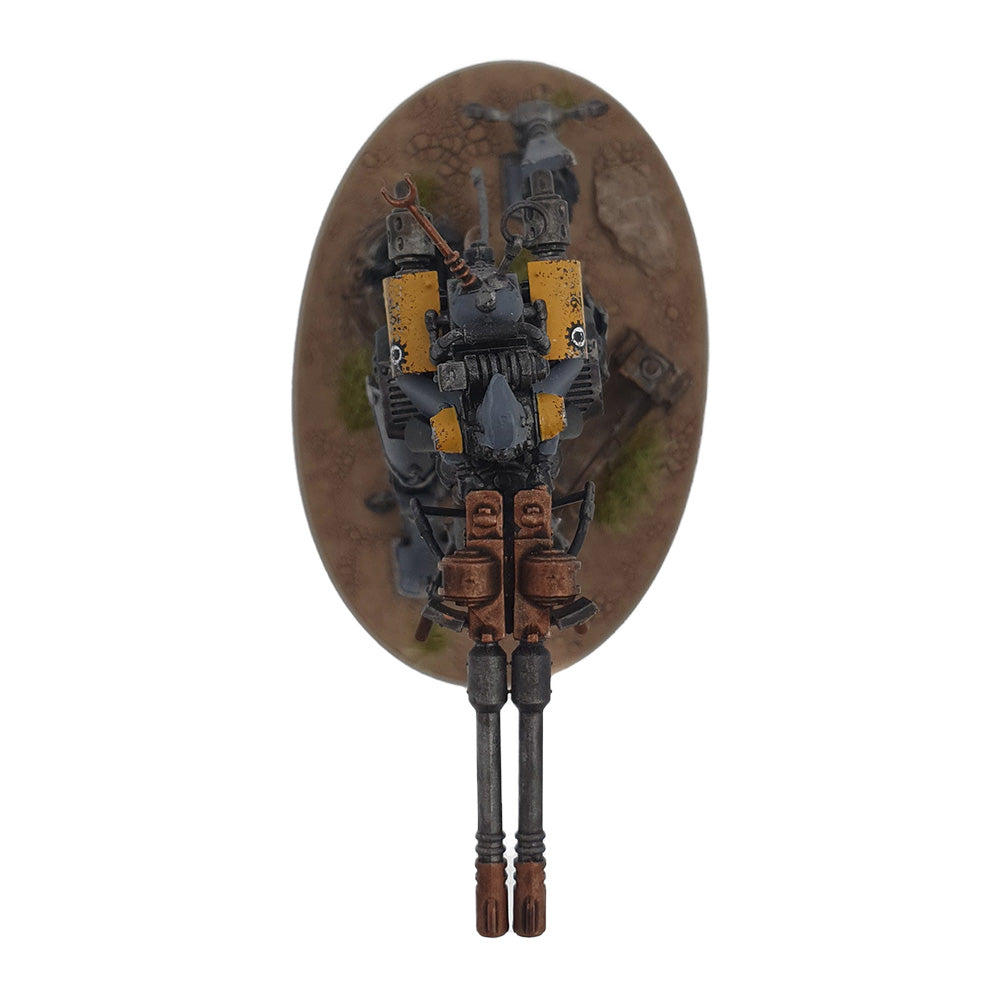
The Ironstrider is the useful edge case. It walks on two legs, which makes people reach for a round, but from above it is plainly elongated, so it goes on an oval (GW lists it on 105 × 70 mm). Count legs for nothing; look at the outline.
This is a rule of thumb, not a law — some models are designed to overhang their base on purpose (big wings, long tails) and some games fix the size regardless of the sculpt. It will get you the right answer for most models, and the template settles the rest.
How do I check the size on a printed template?
Download the template for the shape you need, print it on A4 at 100 %, and put the model in the middle of it. Each ring is numbered; the legend on the sheet tells you which base size the number is. The smallest ring the whole footprint sits inside, with a millimetre or two to spare, is your base.

Example: the Onager Dunecrawler's legs land between rings 10 and 11. Ring 10 is too small, ring 11 clears the legs, and the legend says 11 is the 130 mm round — which is what GW lists for it.
The same sheet works for a whole squad at once: lay several models on it to see whether every pose fits the size you are planning, before you buy bases. That is also the quickest check for a 3D print whose scale you are not sure of.


Free templates — download and print
- Round bases template — PDF
- Oval bases template — PDF
- Square bases template — PDF
- Rectangular bases template — PDF
- All bases in one file, 35+ sizes, one page per base — PDF
The links open in the browser, so you can print straight from there without saving anything. The files are free for non-commercial use; please do not modify them.


How do I print the templates at true scale?
Print at 100 % ("actual size"). Do not use "fit to page", "shrink to printable area" or any scaling option — that is the one way to get every size on the sheet wrong by a few per cent. The templates are A4; on Letter paper, 100 % still prints the circles correctly, the margins just change.
Then check: put a ruler across the 25 mm circle. If it reads 25 mm, the sheet is right. If it reads 24 or 26, the printer scaled it — go back to the print dialogue, not the ruler.
The all-in-one file has a contents page and one base per page, smallest to largest, so you can print only the page you need. Each page is drawn so that several models fit on it side by side.

What if my model fits between two sizes?
Take the bigger one, with two exceptions. If the model is a unit in a game that measures from the base, use the size that game lists, even if the sculpt would fit on something smaller — a Terminator on a 32 mm base is wrong at an event however well it fits. And if the bigger size looks silly under a small model, a converter ring lets you keep the small base glued on and still present the right footprint for the game.
For what it is worth, the bases people buy from us most are 25 mm square and 25 mm round, then 40 mm round, 20 mm square and 32 mm round (our orders, autumn 2026). If you are basing ordinary infantry, the answer is very likely one of those.
What about odd-sized models — squares, rectangles, scratch-builds?
3D prints, old metal models, dioramas and big conversions often need a size no game lists. The square template below goes up to 150 × 150 mm in steps, and you can print two or four sheets and tape them together for anything bigger. Put the model on it and read off the smallest square or rectangle it sits inside.

Once you know the size, you have three options: a standard base that is close enough, a laser-cut HDF/MDF base (cheap and fine for Titans and gargants), or a plastic one made to that size. We make the third — Base Builder takes round, square, rectangular or oval from 10 to 290 mm.
No printer? Draw it
A pencil, a ruler and a pair of compasses reproduce every round, square and rectangle on the sheets — the dimensions are all in the legend. Ovals are the only fiddly one: an ellipse with two pins and a loop of string is the old drafting trick, or draw the bounding rectangle (e.g. 60 × 35 mm) and round the corners by eye; for choosing a size, the rectangle is close enough.
How big is a Warhammer base really?
Not what the name says. The name is a size class; the plastic is a millimetre or more off it either way, and the top is always narrower than the bottom because the sides taper. We cut our rounds to the GW pattern, and these are the numbers straight from our CAD:
| Nominal size | Footprint (bottom) mm | Top surface mm | Height mm |
|---|---|---|---|
| 25 mm round | 25 | 23.8 | 3.5 |
| 28 mm round | 28 | 26.8 | 3.8 |
| 32 mm round | 31.6 | 29.4 | 4 |
| 40 mm round | 39.6 | 38.6 | 4 |
| 50 mm round | 49 | 47.3 | 4.2 |
| 60 mm round | 63.6 | 62.4 | 4.2 |
| 70 mm round | 69.1 | 67.47 | 4.2 |
| 80 mm round | 79.1 | 77.4 | 5 |
| 90 mm round | 89.5 | 87.6 | 4.3 |
| 100 mm round | 98.5 | 96.9 | 5 |
| 130 mm round | 130 | 127.34 | 5 |
| 160 mm round | 158 | 154.53 | 4.5 |
So a "60 mm" base is 63.6 mm across the bottom lip and 62.4 mm across the top; a "32 mm" is 31.6 mm wide; a "25 mm" is 25 mm at the footprint but 23.8 mm on top. Heights run from 3.5 mm (25 mm) to 5 mm (80, 100 and 130 mm).
Which number you need depends on the question. Checking whether a model fits: the top. Checking whether a base fits a movement tray, a converter ring or a display slot: the footprint. On the templates, leave a millimetre or two inside the ring — a model that only just fits will overhang the narrower top surface.
Every size in the table, and most that are not, is in our range as plain plastic, ABS or 3D print — and for anything else there is the Base Builder.